
We all love music , quality music even sounds greater and is addictive. In this post im going to give some tips on how to get most of your music experience and enjoy life!!
So lets get straight ahead and lets get started, Here are the some few tips you can try.
Tip 1 : Tweak your Favorite music player
Enhance sounds
You can tweak your favorite music player to get best of it , You can set equalizer to bass booster enhance the sound quality and set sound mode to high definition. I use iTunes so i'll be taking you through tweaking my favorite music player. Simply follow the steps below:
Step 1: Open up iTunes preferences
 Step 2: Under iTunes preferences click on Playback tab
 Step 3: drag the sound enhancer button to high (double click on image below to play)

Adjust equalizer settings
After you have enhanced your sound then its time to get a serious equalizer tweak for adjusting and applying equalizer effects just follow the simple steps below:
Step 1: click on window tab and then choose equalizer
 Step 2: Choose your favorite equalizer setting in my case it's bass booster ( you may try bass booster its awesome)

Tip 2: Balance your stereo speakers/headphones
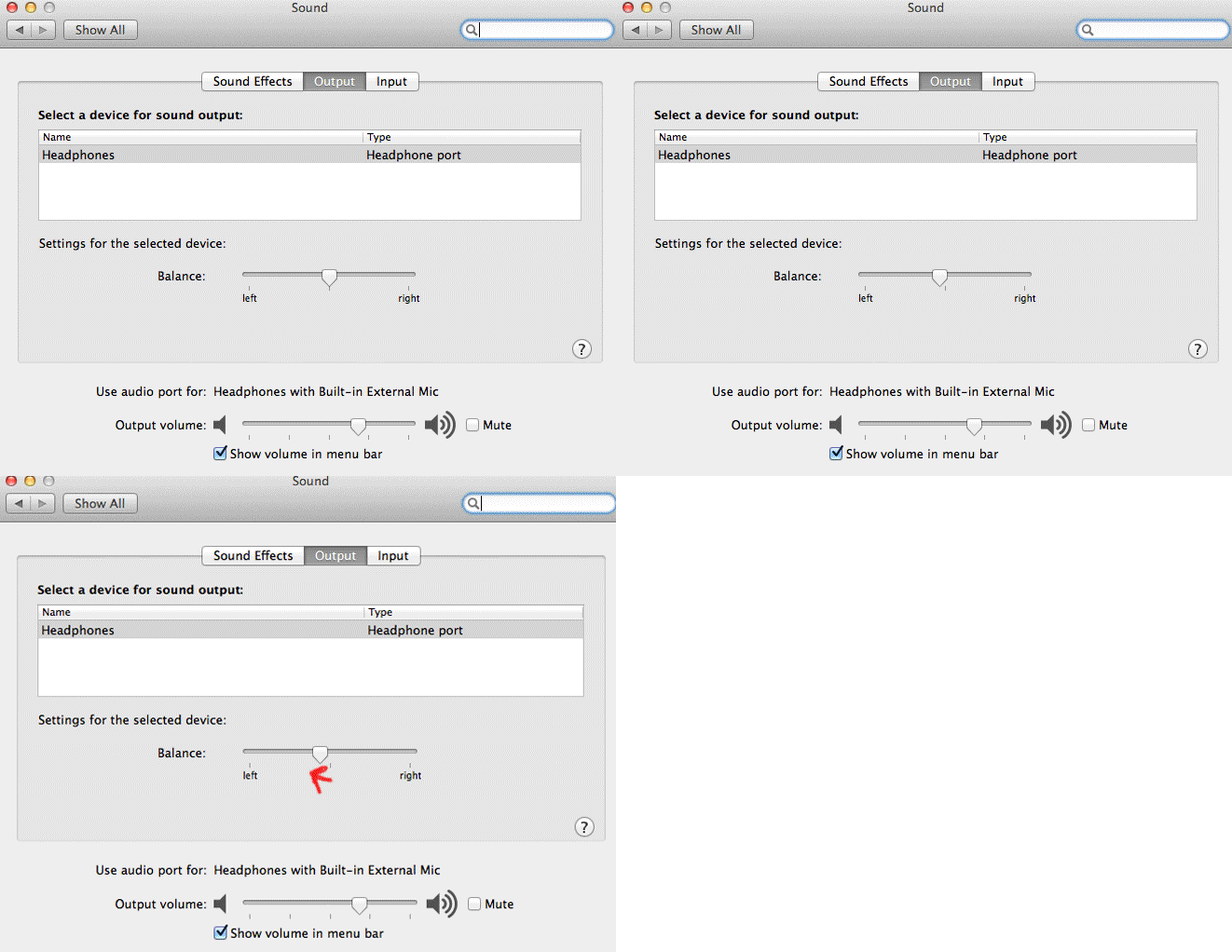
Since left ear can hear music quite good than your right ear so balancing your stereo speakers to left might help a lot. Since im using OSX i'll be taking you through its steps ,you can perform similar task on sound settings under control panel on windows OS.
Step 1: Open up preferences
 Step 2: Click on sound icon
 Step 3: Now drag the button to left (click on image below to play)
 It really worked for me , You give it a try if it doesn't works for you then use the default settings provided.
Tip 3: Always download high quality songs
If you want to enjoy good music with greater sound quality you can buy them , never download songs from website , if you want high quality songs you can get them on torrent( i don't recommend you doing this , its illegal) be sure to choose songs that are more than 200 kbps in bit rate.
Tip 4: Never download songs from particular website that gives you songs free of cost
Though this might not be applicable for all but it's the same on most of the website , the songs you get on those websites are mis labelled, without artwork , without artist name without album name and are of very low quality.
Tip 5: Use better headphones
Only using the better sounds might not work using better head phones gives you better boost to excellent hearing pleasure, I can recommend you to go through bose headphone they are cheap( not that cheap BTW) and produce better sound than any other headphones , Apple headphones works quite fine.
If you found this post useful make sure to like this post (just by clicking the like button), If you faced any trouble to get above things done then let me know on the comments below, If you have any goods tips on this topic then help me to update this post , don't forget to mention them on the comments below.
So lets get straight ahead and lets get started, Here are the some few tips you can try.
Tip 1 : Tweak your Favorite music player
Enhance sounds
You can tweak your favorite music player to get best of it , You can set equalizer to bass booster enhance the sound quality and set sound mode to high definition. I use iTunes so i'll be taking you through tweaking my favorite music player. Simply follow the steps below:
Step 1: Open up iTunes preferences


Adjust equalizer settings
After you have enhanced your sound then its time to get a serious equalizer tweak for adjusting and applying equalizer effects just follow the simple steps below:
Step 1: click on window tab and then choose equalizer


Tip 2: Balance your stereo speakers/headphones
Since left ear can hear music quite good than your right ear so balancing your stereo speakers to left might help a lot. Since im using OSX i'll be taking you through its steps ,you can perform similar task on sound settings under control panel on windows OS.
Step 1: Open up preferences


Tip 3: Always download high quality songs
If you want to enjoy good music with greater sound quality you can buy them , never download songs from website , if you want high quality songs you can get them on torrent( i don't recommend you doing this , its illegal) be sure to choose songs that are more than 200 kbps in bit rate.
Tip 4: Never download songs from particular website that gives you songs free of cost
Though this might not be applicable for all but it's the same on most of the website , the songs you get on those websites are mis labelled, without artwork , without artist name without album name and are of very low quality.
Tip 5: Use better headphones
Only using the better sounds might not work using better head phones gives you better boost to excellent hearing pleasure, I can recommend you to go through bose headphone they are cheap( not that cheap BTW) and produce better sound than any other headphones , Apple headphones works quite fine.
If you found this post useful make sure to like this post (just by clicking the like button), If you faced any trouble to get above things done then let me know on the comments below, If you have any goods tips on this topic then help me to update this post , don't forget to mention them on the comments below.
