Wednesday, September 12, 2012

How to exit recovery mode on iPhone ?

You might have accidentally entered  recovery mode on your iphone or iPod touch or for whatever reason or you might be stuck on Recovery mode, Don't panic in this post i'm taking you through simple steps on resurrecting your iDevice out of recovery mode.

Stay behind your computer connect your iDevice to your computer and lets get started

Step 1: Before we begin download a copy of Tiny umbrella  here. ( its totally free and is available both for mac and windows)

Step 2: Install Tiny Umbrella to your computer.

Step 3: Open Tiny Umbrella and connect your iDevice to your computer


Step 4: Select your device from the left corner (click on those bizarre numbers or simply if your device name shows up click on it ) 


Step 4: Finally click on exit recovery


Wait for your device to restart and then you are completely done.

were you able to complete this process ?, Did you got out of recovery mode ? or if you think you have any problem completing those steps, let me know on the comments below.

Sunday, September 9, 2012

Enhance your music experience

 We all love music , quality music even sounds greater and is addictive. In this post im going to give some tips on how to get most of your music experience and enjoy life!!

So lets get straight ahead and lets get started, Here are the some few tips you can try.

Tip 1 : Tweak your Favorite music player

Enhance sounds

You can tweak your favorite  music player to get best of it , You can set equalizer to bass booster enhance the sound quality and set sound mode to high definition. I use iTunes so i'll be taking you through tweaking my favorite music player. Simply follow the steps below:

Step 1: Open up iTunes preferences
Step 2: Under iTunes preferences click on Playback tab
Step 3: drag the sound enhancer button to high (double click on image below to play)

Adjust equalizer settings

After you have enhanced your sound then its time to get a serious equalizer tweak for adjusting and applying equalizer effects just follow the simple steps below:

Step 1: click on window tab and then choose equalizer
Step 2: Choose your favorite equalizer setting in my case it's bass booster ( you may try bass booster its awesome)


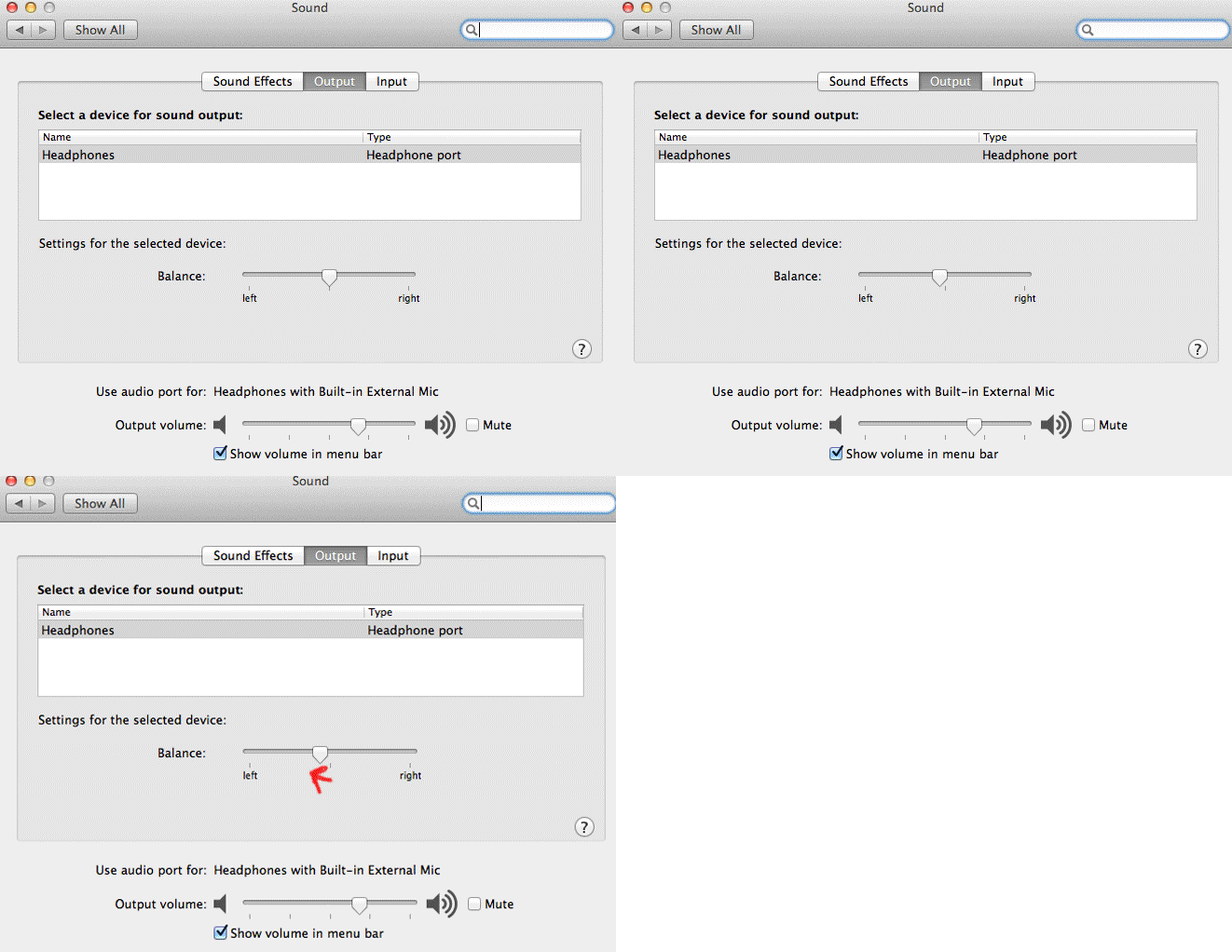
Tip 2: Balance your stereo speakers/headphones 
Since left ear can hear music quite good than your right ear so balancing your stereo speakers to left might help a lot. Since im using OSX i'll be taking you through its steps ,you can perform similar task on sound settings under control panel on windows OS.

Step 1: Open up preferences
Step 2: Click on sound icon
Step 3: Now drag the button to left (click on image below to play)
It really worked for me , You give it a try if it doesn't works for you then use the default settings provided.

Tip 3: Always download high quality songs

If you want to enjoy good music with greater sound quality you can buy them , never download songs from website , if you want high quality songs you can get them on torrent( i don't recommend you doing this , its illegal) be sure to choose songs that are more than 200 kbps in bit rate.

Tip 4: Never download songs from particular website that gives you songs free of cost

Though this might not be applicable for all but it's the same on most of the website , the songs you get on those websites are mis labelled, without artwork , without artist name without album name and are of very low quality.

Tip 5: Use better headphones
Only using the better sounds might not work using better head phones gives you better boost to excellent hearing pleasure, I can recommend you to go through bose headphone they are cheap( not that cheap BTW) and produce better sound than any other headphones , Apple headphones works quite fine.

If you found this post useful make sure to like this post (just by clicking the like button), If you faced any trouble to get above things done then let me know on the comments below, If you have any goods tips on this topic then help me to update this post , don't forget to mention them on the comments below.

Thursday, September 6, 2012

Disable user account control in windows 7

User account control (UAC) in the windows determines which user has how much of control over a file, data or a system.
You might want to create an exploit on you friends or any victims computer for future easy access then you might also want to go for disabling user account control. Disabling user account control allows all users and system to execute any/all type of files present on a computer.

In this post i'm going write steps on how to disable user account control in windows 7 using batch command execution. To disable user account control simply follow the steps below:

Step 1: press windows+R key to open RUN

Step 2: Type in "Notepad"

Step 3: Notepad window will open up then past the exact codes to your Notepad
 " C:\Windows\System32\cmd.exe /k %windir%\System32\reg.exe ADD HKLM\SOFTWARE\Microsoft\Windows\CurrentVersion\Policies\System /v EnableLUA /t REG_DWORD /d 0 /f " without quotes.
Step 4: Press Ctrl key +S then save it to Desktop

Step 5: Save file name  as " DUAC.bat "  and set as all file type remember all file types

Step 6: Double click on the file you just created then restart the computer and then you are done.

I hope this helped if you have any confusions then let me help you, you can mention them on the comments below.

Wednesday, September 5, 2012

How to delete labels on blogger ? permanently

You might have  created many labels and by time you realized that they are junk , You might have done it intentionally/ unknowingly/mistakenly whatever the reason is you don't have to worry about it.
In this post i'm teaching you how to delete labels from your blogger. Before you delete your labels you must acknowledge the steps you are going to perform is permanent.

Lets get started straight,  just follow the simple steps below:

Step 1: open up your blog

Step 2: Signin to your blog, if you are already signed in then just skip this step.

Step 3: After you are signedin now fill up you credentials, again if you are already signed in then just skip this step.

Step 4: Now you are good to go again, Now  reopen your blog by typing your blog address
for e.g mine is : http://makingawareof.blogspot.com

Step 5: click on design

Step 6: Once design window appears click on old blogger interface under settings icon


Step 7: Now you're  switched to old blogger template, dont worry you can always  switch back to new interface with a single click at any time, click on Edit posts 
Step 8: A new Window like below appears having labels vertically on left and your available post on the body section. Now click on the label you want to delete. Here i have selected android


Step 9: tick on the posts from which you want to delete label (you can tick on all the posts).
Step 10: Finally under label actions on remove label click on any label to delete it permanently, you can try this on as many labels you like
It worked totally fine for me, What do you think did this helped you ? OR do you have any other new techinques/methods to permenantly delete labels on blogger?, let me know in the comments below.


Friday, August 31, 2012

How to recover wifi password ?

In this post I'm going to teach you how to recover wifi password, wait up a sec - not wifi hacking or any
MIM attacks.

If you have already set up your computer to the router and you have typed a password to connect to that router , it means that the passwords you have typed in are stored somewhere in the computer so that every time you open up your computer you don't have to enter wifi password again and again.

If you have ever lost your password or trying to recover wifi password or you want to know your neighbors password (well i don't recommend you doing this) then simply follow the steps below:

Step 1: download wirelesskey view from nirsoft
Step 2: Extract the archive somewhere on the Desktop
Step 3: Double click to up open the application then you are done once the application is running it will start to collect all the data on wifi password from your or your victims computer.


all it takes is a software download to recover your wifi password, so what do you think about your own security and how are you tackling it ? feel free to leave answers on the comments below!!


Thursday, August 9, 2012

How to get your own QR codes ?

If you have less of information on What QR codes really are? Then head over here to get all the details.

You might think that getting Your QR codes might get too lengthy, do i need to  get through certain machines?, buy them? , approve them ?  and blah blah blah . You don't have to think about that ....

Its as easy as opening Facebook and chatting, To make your own QR code all you have to do is go to this website qrcode.kaywa.com and then select the type of input data ,  type in what you want to generate QR codes for (it can be a phone number, website, normal text, sms etc)  and then click on generate free. That's it! you are done!!!

Below is the QR code of my website:

Monday, August 6, 2012

How to erase datas securely

When you delete a file in windows or any operating system only the original file is deleted , The file still exists on a memory OR Temporary files meaning that it still can be recovered and proves the fact that it is where it is.

MACOSX
You are lucky if you are using MACOSX because you get inbuilt industry standard securely data erasing methodology. Of course it does not perform by itself you have to do that. To securely erase your confidential datas just follow the steps below.


NOTE: Performing the steps below will not format your computer, rather prevent it from recovery of your data.

First delete the data you dont want to recover then get started through these steps.
Step 1: Head to applications and then under Utilities open up native mac application named Disk utility.
Step 2: On the left side select the Disk
Step 3: Once you have selected your disk click on the erase tab.
Step 4: Now click on Erase free space
Step 5: Now scroll the bar to the most secure and click on erase free space.
Now you are done!!

clicking on erase free space will overwrite the data stored on memory and data accessible to MACOSX hence preventing your data/file from recovery.

WINDOWS
There are plenty of tools available for windows machine - in this post i'm taking you through one -my recommended one!
 Eraser its a tool for windows which makes it very easy for securely erasing datas. It erases data with gutmann method and also allows the number of times the data to be over written. You can immediately delete or schedule for erasing free space on any hard disk.You can get this installable version from here and portable version for carrying on your pendrive here

Tuesday, July 31, 2012

How to install paid applications on iphone for free

Hello everyone!! i'm back with some awesome  post today, You'll love it , of course who doesn't loves a free thing! Today you'll be learning on how to get a paid application on iOS devices for free. To do that just follow these easy and simple steps below

note: To get started you need a jailbroken iphone.

Step 1:To jailbreak your phone click here and then got through rest of the information provided.
Step 2: After you successfully jail broke your idevice add cydia.xsellize.com and sinefuliphoerepo.com
as your source to those who are unaware on how to add sources on cydia head over here
Step 3: You are half done, Now goto search and then search for "installous" without quotes.

Step 4: Now select installous 4 and then tap on confirm and then install.


Step 5: After you did all this leave rest of the process for iphone itself it will do all for you. just wait until  the process completes and then tap on return to cydia or restart springboard( if available).

Step 6 : Now open up the cydia app "Installous" you just downloaded and then try searching for your favorite app and then download or you can just head over browse and then choose over thousand of applications.
Hope you downloaded paid applications for free. Incase if you were not abe to - then feel free to share your thoughts on the comments below.

Caution: Downloading of these pirated apps can be illegal so i don't recommend you togo through these You better consider the hard work of developers and let them earn money.

Saturday, July 28, 2012

How to block facebook without using any softwares

Though this tutorial might be too old and widely used, I am again taking you through this tutorial , In this post I'll be writing on how to block Facebook without using any software.That sounds awesome when you have no software available , manually blocking Facebook might sound painstaking but its as easy as hell !!

Note: This tutorial is intended for windows, however you can follow the same process for MACOSX in details for MACOSX check out here.
Step 1: Goto location c:/windows/system32/drivers/etc then create a backup copy of "host" file to desktop.
Step 2: goto start menu then type "cmd" without quotes.
Step 3: right click on cmd then click on run as an administrator.
Step 4: Type in the following commands in the command prompt window "notepad c:/windows/system32/drivers/etc/hosts".
step 5: Notepad window shall appear , type in the www.facebook.com at the last or technically after the ip address listed (you can type in any website you want to block).
Step 6: now simply press ctrl+s to save then you may close thenotepad window.
Step 7: Go to the same location again then create a backup copy of edited hosts file.
Step 8: you have already edited the hosts file and Facebook is already blocked but its time to play smart , you have created the back up of both hosts file edited and original one on desktop so if you want to block facebook simply copy the file to the location stated above if you want to undo the process simply copy the original host file to the same location.


Saturday, July 21, 2012

Websites that teaches you how to code

Having a free time or are you a passionate geek ? great! In this post i will be listing some of the awesome websites that teaches you how to code on several programming languages like: php, javascript, CSS, C++, Python, Ruby and lot more without sucking any penny out of you.

1. codecademy.com
This is my personal favorite , recently i've also been learning javascript and it nearly finished (like it matters). This website teaches you javascript,html, html css and lot more. It has got an awesome interface, Unique teaching and learning methods. I found it to be very interactive which keeps you constantly engaging and trust me you'll be in love with this website , actually it teaches such a good way that you cant never leave in the middle of the course.

2. Team tree house
this website has got a great interface, there are courses on webdesign, web development and ios development. You'll probably get impressed with its videos but i think something's missing , courses are not  complete and most of all there are two versions of it free and paid.If you are studying for free in this website then thats the reason why videos and contents are not complete.

3. ruby monk
Most of you are not ofcourse not familiar with ruby , its a programming langauge developed by a japense developer in 1990's. Its very easy to learn and use ,so if you are not familiar with programming it is recommended that you give it a try. This website is very interactive and has got a good UI.

4. hackety hack
This is a website that teaches you to code on Ruby programming language also this website has got a good UI. This website teaches with an ease. This website teaches you some basics however many contents are missing . you can also download ruby app for mac which provides a platform for learning ruby.

5. Jquery air
It teaches jquery on video based tutorials you can also buy more package for further learning.

6. Coding bat
This website has got pretty unimpressive UI (not attractive) For those who want to learn python and java this site is good. You can learn these programming languages with an ease than other websites. But if you really want to learn this website is worth a try.

7. php know how
This website is for the people who want to learn PHP and mysql its a good website that teaches you php and mysql practical basics.

8. mongo DB
Though i've no idea what it means im still describing-mongo, its a  high performance open source NoSQL database. Written in C++, MongoDB features.

9. Udacity.com
Its a great website for the advanced programmers here you can learn on some awesome topics like how to build a web browser , how to build a search engine with no basics of python, how  to build algorithms, how to program a robot, cryptography and lot more. Its a good website to get involved in - this websites also hosts programs and give you jobs if you are eligible. Recently it has offer that upon completing courses and passing exams you can win a trip to silicon valley.

10. academic earth
If you want a online degree from various subjects to choose with from several universities then this is the right one for you, you can obtain online degree on enterpreneurship, humanities, philisophy, mathematics, IT, technology and innovation and lot more.

11. ted.com
This site includes all videos relating ideas, motivating and inspiring videos , tech videos/lessons, and many variations on topic.

12. w3schools.com
This is another good website that teaches you how to code. In this academy you can learn to build websites, HTML , Client side scripting, Server side scripting with SQL and php, ASP.NET and e.t.c
It has got a great interface, Its engaging and has got a great online editor which keeps you just going and going.


Sunday, July 15, 2012

Know if your email address has been hacked

There has been discovery of lot of security breaches and many website have been hacked , recently linkedin , sony website and user database, yahoo and many other major websites. To make sure you are not the one who is/is not hacked just click here give your email address and then check if any compromises are made on the email host database. Also you can suscribe if major security breaches occur , You can also discover compromises that are not listed on media. I've checked my all email addresses have you ?
should i change my password


I personally recommend to checking your all mailing-addresses.

Thursday, July 5, 2012

Deciphering MAC address

Deciphering MAC address ? You knew that you can know your vendor name/company name that build your computer. (For those who Have less information on MAC address , it stands for media access control , it is the unique ID assigned for each unique computer.) You might want to get details of your neighborhood or your partners computer or any other person for any reason. Just proceed below to  do it.

Do get details of the computer just by knowing its MAC address click here>> then enter  MAC address, see its that easy!

And you're done!!!
For any reason if you could not, Then feel free to mention your  reason in my comments below!!

Wednesday, July 4, 2012

How to change SSH password on iphone ?

What is a SSH?
It is a network protocol for secure data communication over insecure networks, It is used for remote command execution , remote shell services and acts as a secure network  between networked machines.

Why is SSH necessary ?
Like I stated before it is used for secure file transfer between devices and mostly when it comes to hacking "remote command execution".

Most of the iphone users who have their iphone jailbroken install open SHH , Ifile and more than 90% of them forget to change their default SSH password. Where the real trouble begins ,Before we get started on how to change SSH password i would like to tell you why changing SSH password is necessary, simply it is because most of the hackers know the default password (which is same on all iOS devices) they use your default password and do sort of port scanning from their machine and use SSH clients to find if your device is vulnerable and  finally gaining access to your iphone stealing all your confidential information like notes, contacts and mainly your private photos. And thats how you are hacked!!

You look WTH now ,dont you ? You probably might want to change as quickly as you can now, Do not worry by following these quick  steps you can  easily change SSH password.

note : this is only for jailbroken iphones for non-jailbroken iphones dont worry you are more safer on the hands of apple.

Step 1: Open up cydia and search for mobile terminal


Step 2: Tap on install


step 3: Tap on confirm

Step 4: wait until the process is complete


Step 5: open up the mobile terminal you just downloaded using cydia.

Step 6: Type in "su root" without quotes

Step 7: Type in "alpine" (alpine is the default password for all idevices using open SHH) in password field then tap return.

Step 8: type in "passwd" and then tap return


Step 9: type in the new password you want to change to

You are done , hope you successfully changed your SSH password, if you are in trouble then let me know in the comments below.

Monday, June 25, 2012

How to Put your device on DFU mode?

Simply follow these steps to put your device on a DFU mode
Step 1: Connect your iphone/ipod to itunes
Step 2: firstly turn off your idevice
Step 3: hold the power button for 3 secs.
Step 4: Without releasing the power button press the home button for 12 seconds
Step 5: now release the power button and then only press the home button until the itunes pops up saying that your device is in recovery mode

Note: Not to confuse with recovery mode , when an idevice is in recovery mode your screen appears saying that it is in recovery mode while you can only see dark/blank screen when your idevice is in DFU mode.

Saturday, June 23, 2012

Maintaining privacy online.

Maintaining privacy online is a big challenge today , may websites like facebook, twitter , google advertisement track your interest , location , your activity and much more the know you more than your daddy, when you access internet ? what location are you currently in ? , how much devices you access web from? , what time you wake up? , what are you planning for vacation?, who are you with ?, well thats enough said , well if you really care for privacy you might want to go through rest of my tutorial.

1. Use anonymous proxy : You can use anonymous web proxy websites like www.hidemyass.com , www.atunnel.com  they simply change your ip address to anonymous ips and secure your connection using SSL connections. Anonymous proxies  fake  your original IP address to fake IP address. Now you gain much of anonymity here and good thing is that its a completely free.

2. Dns and proxy settings for web browsers : You can edit proxy settings on your web browsers to remain anonymous online. know how to edit proxy settings on google chrome browser over here.

3. Use of proxy softwares : You can use proxy softwares like security kiss , Tunnel bear , uno telly free , Tor free download. just edit the settings and just a single click will give you instance access to proxy feature.

4. Use of VPN services : Vpn stands for a virtual private network. It is highly secure , whenever you are out of your home and office , you can use VPN services .To use VPN services you can use softwares like hamachi VPN  service (you can download the personal version on the web for free). To use this service you have to install the software on two computers ,one on the home computer that is always ON and other computer the one that you carry with. If you are in coffee shop and your are accessing internet with turned on VPN, all the passwords you enter forms and datas are securely transfered to server, they cannot be sniffed or stolen by using man on the middle attacks like ARP spoofing / poisoning. Basically,  When VPN services are used then it makes act like your travel computer is  using the internet through your home computer rather than router present on the coffee shop you are sitting at.

5. SHH tunnel : secure and trusted networks are not always available , so here i will show you how to keep pop3 , IMAP and passwords safe and prevent them form snarfing.

SHH tunnel is a secure tunneling protocol that creates a secure data travel path within unsecured/untrusted networks.

You dont have to be a hard core unix geek to create a shh tunnel , software made easy - You can download shh tunnel manager and with a click of a button you are good to go the Hell !! secure way!!

Sunday, June 17, 2012

How to completely remove traces from your computer?

You might have done things that you think that are private and confidential  on your computer and majority of people think that once it is done is done but it is completely not true. The tasks you carry out  are stored on a temporary memory or on a ram or somewhere on your hard disk. Your browsing history, Played movies, Open applications, deleted fotos are stored for a temporary use on some location. By knowing this you probably might want some hardcore privacy , In this tutorial ill be teaching you some privacy stuffs and get work done without leaving any traces on your computer. Just follow through the rest of the process below.

1. Clean up browsing history: Every website you visit are recorded by your web browser,  It is necessary that you clean   up browsing history to remain least anonymous . You can also use Private browsing feature available in safari , Private browsing does not records any history and cookies from visited websites also you can disable syncing on google chrome to prevent it from tracking you.

2. Clear recent items: To remain untracked you can clear recent items on windows to clear it press "windows +R" then type "recent" without quotes these items are the items that you are using recently, delete all those item of course to remove tracking and also to free up some memory on your computer.

3. Use third party apps : It is ideal that you use third party apps like Ccleaner its my personal best and most recommended that you use it and of course it is completely free , Also you can use softwares like tuneup utilities to clean files and remove up traces. These softwares can delete browsing history of all web browsers, Cookies, Temporary files even used by third party apps like Vlc, Skype and lot more.

4. Formatting:  You might be thinking that formatting a pendrive might permanently delete  the data stored on it then  you are on hugely misguided , actually you can use softwares like recuva to recover your data even from completely formatted pendrive. So when you format a pendrive format your pendrive make sure that you format pendrive not faster but n higher level of security , this feature is available on macosx (industry standard security) but you can use third party softwares on windows like ccleaner.

Note: Privacy apps and security helps you not to get tracked  however nothing is perfect, it depends on a person that how much he cares for his  privacy.


Thursday, May 31, 2012

How to download movies or any other stuffs using torrents?

Well who doesnt want to get stuffs for free , its great to get stuffs for free. In this tutorial im goin to show you how to download movies, videos, books , muisc for free. Just follow these simple steps to download anytthing for free using torrents.
Step 1: goto torrent sites in these torrent sites  you'll get torrent files for movies , documents , videos and music. some of the torrent sites are listed below:http://kat.ph/http://thepiratebay.sehttp://www.mininova.org/Step 2: Then search for the movie or any content to downloadstep 3: Click on the link that is listedStep 4: Click on the download torrent fileStep 5: Now you need the torrent client , you can download the bittorent client from hereStep 6: After you have downloaded bittorent install the software.Step 7 : After you have fully installed the bittorrent then double click on the file you just download from the torrent websiteStep 8: Now you are done the file has already started downloading so just wait for ETA . ENJOY!!
Note: Using of torrent for criminal purpose , copyright infingerprintment , stealing , violating law is illegal. use torrents only for legal issues. It can be used for sharing files online that are huge. (most appropriate)Hope you downloaded the file you wanted to , If you were not able to download then let me know in the comments below so that i could fix your problem.

Wednesday, May 30, 2012

Tips for getting a genuine iphone

There are a lot of bad  people around who try to sell a fake robbing good people like you , with the tips below you'll never be fooled again. So here are a few tips you seriously might need to know while you go for a new iphone  in a non-apple store/ retail / mobile shop around you.


1. Check for IMEI , First watch for the IMEI of the phone to find where it is goto settings> general> about -note the IMEI number then head towards the apple store IEMI check and then enter the IMEI code then you'll get the information on number of days used , warranty violation date, days left for apple consumer support .

2. Check for the IMEI number on the down side of the sim tray , open up the sim tray using a pin - turn the tray upside down  If you dont see the machine written IMEI code stop right there it might be a used phone or a phone using a gevey sim or any duplicates or any prototype.

3. Check for headphones , check whether headphones is correctly working or not , plug in the headphones then turn the headphone jack whole circle and check whether that headphones plug works correctly.

4. Check whether the phone is jailbroken (if you dont know what jail breaking means get the information from here ) , check whether Cydia or any third party software is installed on iphone, also dont buy if the OS is other than iOS (if you dont know what iOS is get information from here and dont buy if the phone is jailbroken.

5. Check whether it is already used - You can find by going to apple warranty check , here you can see the duration of the phone used so that you can find out whether that phone is new or not. when you buy a new iphone it must first ask to activate then only it is to be used dont buy if it is already activated and used.

6. Check whether if the phone is up to latest version though this is not necessary but its  always good to purchase a phone that is running the latest version of IOS (recent version is iOS 5.1.1)

7. Check for the model number by going to settings> general> about then seriously dont buy if model number ends with LL it means  the phone has been already used and it is a refurbished one.

8. Again goto settings> general> about then check for serial number then dont buy phone that starts with 5K. again this means that the phone has been already used and this might be a damaged piece remade.

9. Dont buy if the iphone Box looks like a chinese made because it might be a replaced one and seriously dont buy if the seal is broken , tell the seller to open seal infront of you and go through rest of the process.


10. Check for headphones , check whether headphones is correctly working or not , plug in the headphones then turn the headphone jack whole circle and check whether that headphones plug works correctly.


11. Other things to consider
i. Check if it is a china made
ii. Check the graphics quality apple phones and devices always comes with superb graphics quality and better resolutions.
iii. Check for the battery life.
iv. Check whether the phone has a memory card slot , if it has then be sure it is a china made so dont buy that
v. Check for the size of a dock connector and match it with the apple standard size of dock.

Hope you got all the tips u needed. if you got any suggestions or any questions you can leave them on the comments below , i'll be greatful to help you.

Monday, May 28, 2012

How to add sources on Cydia ?

Just follow these simple steps to add sources on cydia

Step 1: Open up cydia

Step 2: goto manage

hack temple run and get free coins

Step 3: Tap on sources


hack temple run and earn  ree coins


Step 4: Tap on Edit
hack temple run to get free coins


Step 5: Tap on Add
hack temple run to get free coins

step 6: Type repo or any source url for e.g i am adding cydia.xsellize.com after you finish typing  tap on add source
hack temple run to get free coins


Step 7: Tap on add anyway if it doesnot asks leave it for few seconds
hack temple run to get free coins

Sunday, May 27, 2012

How to know the right time to wake up ?

You might know when to go for bed but might not know when to wake up.
Some people  feel that they get enough rest by sleeping for 6 hours whereas some might feel tired by sleeping long enough  for 10 hrs , it basically happens due to sleep cycle .

Its a cycle that happens  for 90 minutes ( 65 mins normal , 20 mins non- rapid eye movement and 5 mins rapid eye movement ). Sleep cycle impacts mentality of waking up. waking  at end or beginning of sleep cycle you feel like rested , cool  and morning full of energy while waking up at peak hour makes  you feel like unrested, tired and not completed sleep.

By now you might have understood  long sleep doesn't matters anymore rather the sleep cycle. so how to get perfect timing for waking up ??

I've got an super awesome idea for you. Before you goto  bed just go to this website>> or if you have an iphone you can download "sleep cycle"app  from the app store . After you have downloaded this app or have visited the website then  give your time when you are going to sleep  you'll get the suitable wake up times.

To get the details on sleep cycle clickhere>>

Enjoy super cool mornings !!! Do me a great favor by liking the post below.