Sunday, September 9, 2012

Enhance your music experience

 We all love music , quality music even sounds greater and is addictive. In this post im going to give some tips on how to get most of your music experience and enjoy life!!

So lets get straight ahead and lets get started, Here are the some few tips you can try.

Tip 1 : Tweak your Favorite music player

Enhance sounds

You can tweak your favorite  music player to get best of it , You can set equalizer to bass booster enhance the sound quality and set sound mode to high definition. I use iTunes so i'll be taking you through tweaking my favorite music player. Simply follow the steps below:

Step 1: Open up iTunes preferences
Step 2: Under iTunes preferences click on Playback tab
Step 3: drag the sound enhancer button to high (double click on image below to play)

Adjust equalizer settings

After you have enhanced your sound then its time to get a serious equalizer tweak for adjusting and applying equalizer effects just follow the simple steps below:

Step 1: click on window tab and then choose equalizer
Step 2: Choose your favorite equalizer setting in my case it's bass booster ( you may try bass booster its awesome)


Tip 2: Balance your stereo speakers/headphones 
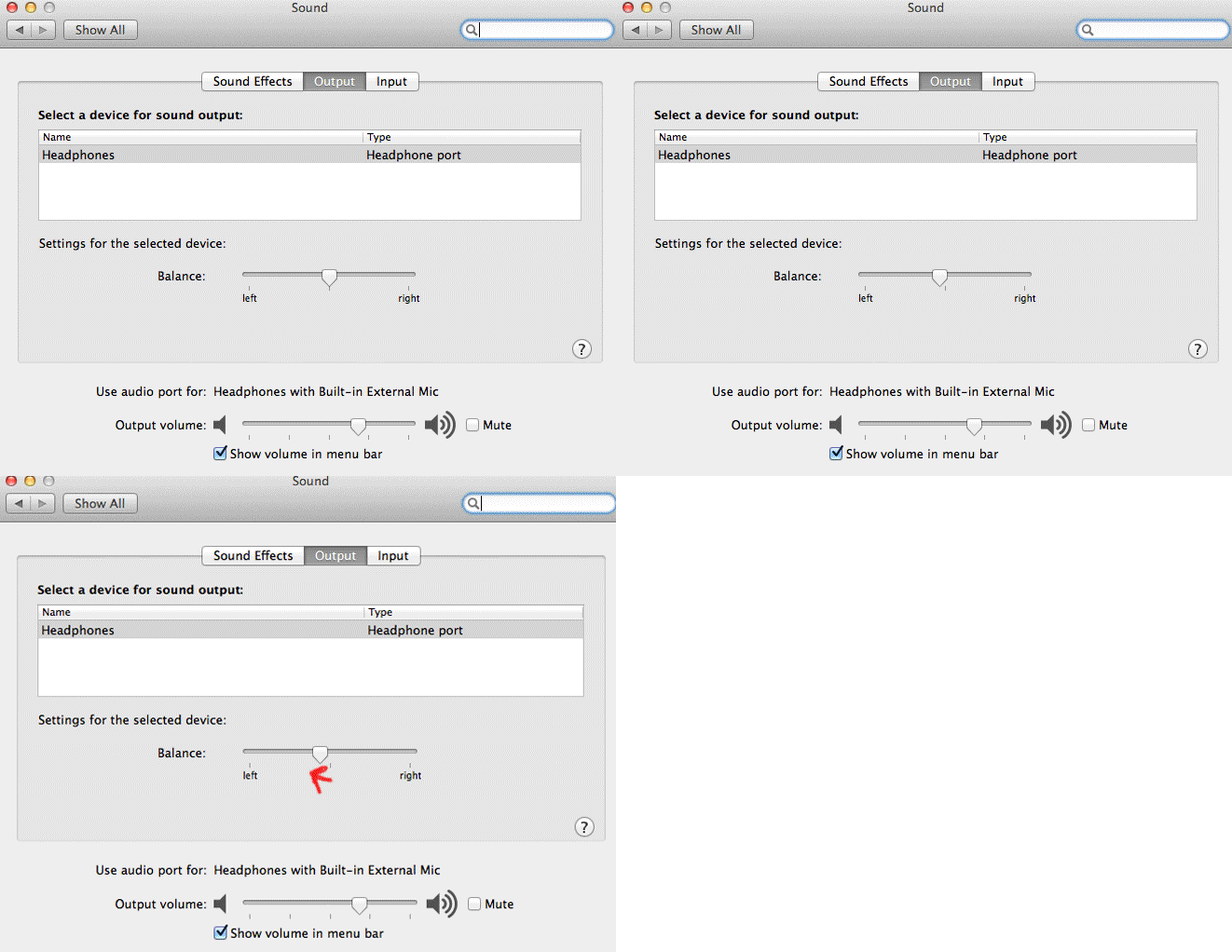
Since left ear can hear music quite good than your right ear so balancing your stereo speakers to left might help a lot. Since im using OSX i'll be taking you through its steps ,you can perform similar task on sound settings under control panel on windows OS.

Step 1: Open up preferences
Step 2: Click on sound icon
Step 3: Now drag the button to left (click on image below to play)
It really worked for me , You give it a try if it doesn't works for you then use the default settings provided.

Tip 3: Always download high quality songs

If you want to enjoy good music with greater sound quality you can buy them , never download songs from website , if you want high quality songs you can get them on torrent( i don't recommend you doing this , its illegal) be sure to choose songs that are more than 200 kbps in bit rate.

Tip 4: Never download songs from particular website that gives you songs free of cost

Though this might not be applicable for all but it's the same on most of the website , the songs you get on those websites are mis labelled, without artwork , without artist name without album name and are of very low quality.

Tip 5: Use better headphones
Only using the better sounds might not work using better head phones gives you better boost to excellent hearing pleasure, I can recommend you to go through bose headphone they are cheap( not that cheap BTW) and produce better sound than any other headphones , Apple headphones works quite fine.

If you found this post useful make sure to like this post (just by clicking the like button), If you faced any trouble to get above things done then let me know on the comments below, If you have any goods tips on this topic then help me to update this post , don't forget to mention them on the comments below.

Wednesday, September 5, 2012

Reasons to choose Google chrome over other browsers

Its been since 4 years that google started  web browser Chrome and  it's already a big hit. In this post i'm going to list some strong  reasons, why you should go for  chrome.


1. It has got a good user interface, simple , yet good looking.I like its UI very much its sleek and simple.

2. Its way faster than any other browser, Its advanced caching abilities and faster javascript execution makes it fastest browser on the planet.

3. It supports for thousands of awesome addons like: ad blocker,Youtube video downloader and other awesome games on chrome web store.

4. Chrome has better memory handling than any other web browsers, you can open as many tabs you like, the crashing of one single tab won't affect another.

5. It has better security and has won several security awards , still we arguably can say it as  a most secured web browsers since all browsers have their own security policies.

6. You can sync your all bookmarks using your email-address , then they are stored in cloud so that you can access them from any devices.

7. Google chrome does not requires external flash it means it is pretty secured.(well you know how many times adobe exploits have been discovered basically on flash)

8. Google chrome has been a universal browser which is available on most of the platforms windows, mac,android and iOS.

Those are the only few reasons that you can choose to use chrome, however choosing a web browser depends upon your own needs , firefox fans user firefox for its versatility , addons compatibility and since it's a open source, many users modify for their own needs , like wise the new safari in mountain lion is way faster than chrome since safari is discontinued for windows you cant use safari in windows anymore.

Which browser do you think is the best?  , what are the reasons behind them? let me know in the comment section  below.

Sunday, August 5, 2012

QR Codes

QR codes abbreviated as quick response code is a type of matrix barcode designed in japan by famous automobile company toyota for tracking down vehicles during manufacturing process, it consistes of black squares which are encoded, with white background. The information encoded in QR code can be made up of standard kinds or modes of data they are : numeric/alphanumeric, binary in bytes and kanji or any kind of data that is supported virtually.

Below is the QR code for my website


In real world practice data stored in QR code can be from a single letter, websites, phone number, Name , other details and e.t.c

Wednesday, July 11, 2012

Your device, OSX Mountain lion compitable?

Apple is releasing its new major release of operating system mountain lion this july and for  its 200 new features , the UI and its all awesome features,  you probably might want your  device updated , before you update -know if your mac  is compatible with apple's latest mountain lion.Here are the list of compatiable devices with its latest version of OSX mountain lion.
copyright: apple.com


  • iMac (Mid 2007 or newer)
  • MacBook (Late 2008 Aluminum, or Early 2009 or newer)
  • MacBook Pro (Mid/Late 2007 or newer)
  • MacBook Air (Late 2008 or newer)
  • Mac mini (Early 2009 or newer)
  • Mac Pro (Early 2008 or newer)
  • Xserve (Early 2009)

Thursday, July 5, 2012

Must have addons and extensions for your browser

Addons are the small utility programs that works with your browsers adding functionality and making them highly customized. If you havent tried any of the Add-ons then you must now , below im going to list some of them that are highly meant for the web and probably for you.

1. You tube downloader
you watch videos on youtube and more than that you have always wanted to download them , most of you have tried downloading third part softwares like imtoo video downloader, fastest youtube video downloader, i want you to get rid of them Uninstall now yes now!! because i've got a better one.
you can download this add-on on google chrome by going to its store and on firefox by visiting its mozilla store,  if you do not have link just google it. Advantage of getting those add-on are that they are totally free, they do not come on trial version and are updated to you tube changed algorithm most often.

2. Ad block plus
This add-on allows you to block annoying small ads thats pops up on the side of youtube giving much pleasure of viewing on youtube, also this small utility blocks other Ads from many advertising websites like google, vigilink letting you less distracted and do much of your job.

3. Scribd pdf downloader
If you use scribd then you know that non-members cannot download a file until they upload one.  with this small utility you are able to download as many Scribd documents you want.

4. Ghostery/collusion
It is a add-on that displays the websites and advertising cookies and websites that are tracking you on real time.

5. Fb photo zoom
This simple add-on enables you to zoom images on Facebook.

6. Hide my ass anonymizer
This add-on allows you to remain anonymous in a one click of a mouse , you do'nt have to visit its page and type in the website and go through rest of the process.


security measures after jailbreaking your iphone

After jail breaking you allow all the third parties to install and give them a freedom and main thing you forget is that your device is not up to apple anymore. If you really care about security i don't recommend you to jailbreak your device, however in long run jail breaking and finding exploits would lead IOS making more secure.
 To secure up your jailbroken device simply do through the processes/steps below

1. Change root passwords: I would highly recommend doing this , If you have installed open SSH on your devices then it is highly important that you change its default password. Else you have pretty big chance that you are getting hacked!! . The steps and details on changing root/SHH password can be found here>>

2. Repo : It is recommended that you dd sources only  from verified and legal repos , like i already said after jailbreak you leave your device to third party and let them gain freedom , to not happen this   do not add sources from unverified repos and do not install apps from those repos.

3. Third party apps: do not believe apps like apps that claim to update status from notification center and so on they may update status but keep track of you all the time stealing your confidential information.

4. Lockdown app: If you really care for privacy install this app from cydia store itself ,this app locks up apps ,messages and photos not letting any people go thorough your iphone.

Friday, June 29, 2012

Top jailbreak feed/information/blog/websites

Today, In this post im going to list some of the websites where we find pretty much of jail breaking / IOS /iphone /Tech news / Blog & Apple related stuffs.

1. limera1n
2. Geohot.us
3. idownloadblog.com
4. jailbreakhow.com
5. unlockboot.com
6. ijailbreak.com
7. http://www.redmondpie.com/
8. greenpoison.us
9. iclarified.com
10. jailbreakme.com
11.ultrasnow.ca
12. redsn0w.us
13. pwnagetool.net
14. cydiahelp.com
15.spiritjb.org

Hope i covered all those websites  , if you know more then let me know on the comments below.

Monday, June 25, 2012

Fix redsnow/jailbreak error 2000

Most of you might have got your iphone jailbroken on iOS 5.1.1 while some might have been stuck on redsnow jailbreak error 2000. If you havent got your iphone jailbroken yet then you should now by getting stuffs here.you might get those errors for several reasons some of them might be restoring from jailbroken backup, previous jailbreak attempts fails e.t.c e.t.c.

Now lets get started- let's fix this problem , you can easily fix this problem of error 2000. Just put your iphone on pwned DFU mode to jailbreak it , before you begin- put your device on DFU mode rather than just clicking jailbreak button. If you dont know how to  put your device on DFU mode then you check out easy and simple steps here.

Saturday, June 23, 2012

Maintaining privacy online.

Maintaining privacy online is a big challenge today , may websites like facebook, twitter , google advertisement track your interest , location , your activity and much more the know you more than your daddy, when you access internet ? what location are you currently in ? , how much devices you access web from? , what time you wake up? , what are you planning for vacation?, who are you with ?, well thats enough said , well if you really care for privacy you might want to go through rest of my tutorial.

1. Use anonymous proxy : You can use anonymous web proxy websites like www.hidemyass.com , www.atunnel.com  they simply change your ip address to anonymous ips and secure your connection using SSL connections. Anonymous proxies  fake  your original IP address to fake IP address. Now you gain much of anonymity here and good thing is that its a completely free.

2. Dns and proxy settings for web browsers : You can edit proxy settings on your web browsers to remain anonymous online. know how to edit proxy settings on google chrome browser over here.

3. Use of proxy softwares : You can use proxy softwares like security kiss , Tunnel bear , uno telly free , Tor free download. just edit the settings and just a single click will give you instance access to proxy feature.

4. Use of VPN services : Vpn stands for a virtual private network. It is highly secure , whenever you are out of your home and office , you can use VPN services .To use VPN services you can use softwares like hamachi VPN  service (you can download the personal version on the web for free). To use this service you have to install the software on two computers ,one on the home computer that is always ON and other computer the one that you carry with. If you are in coffee shop and your are accessing internet with turned on VPN, all the passwords you enter forms and datas are securely transfered to server, they cannot be sniffed or stolen by using man on the middle attacks like ARP spoofing / poisoning. Basically,  When VPN services are used then it makes act like your travel computer is  using the internet through your home computer rather than router present on the coffee shop you are sitting at.

5. SHH tunnel : secure and trusted networks are not always available , so here i will show you how to keep pop3 , IMAP and passwords safe and prevent them form snarfing.

SHH tunnel is a secure tunneling protocol that creates a secure data travel path within unsecured/untrusted networks.

You dont have to be a hard core unix geek to create a shh tunnel , software made easy - You can download shh tunnel manager and with a click of a button you are good to go the Hell !! secure way!!

Sunday, June 17, 2012

How to completely remove traces from your computer?

You might have done things that you think that are private and confidential  on your computer and majority of people think that once it is done is done but it is completely not true. The tasks you carry out  are stored on a temporary memory or on a ram or somewhere on your hard disk. Your browsing history, Played movies, Open applications, deleted fotos are stored for a temporary use on some location. By knowing this you probably might want some hardcore privacy , In this tutorial ill be teaching you some privacy stuffs and get work done without leaving any traces on your computer. Just follow through the rest of the process below.

1. Clean up browsing history: Every website you visit are recorded by your web browser,  It is necessary that you clean   up browsing history to remain least anonymous . You can also use Private browsing feature available in safari , Private browsing does not records any history and cookies from visited websites also you can disable syncing on google chrome to prevent it from tracking you.

2. Clear recent items: To remain untracked you can clear recent items on windows to clear it press "windows +R" then type "recent" without quotes these items are the items that you are using recently, delete all those item of course to remove tracking and also to free up some memory on your computer.

3. Use third party apps : It is ideal that you use third party apps like Ccleaner its my personal best and most recommended that you use it and of course it is completely free , Also you can use softwares like tuneup utilities to clean files and remove up traces. These softwares can delete browsing history of all web browsers, Cookies, Temporary files even used by third party apps like Vlc, Skype and lot more.

4. Formatting:  You might be thinking that formatting a pendrive might permanently delete  the data stored on it then  you are on hugely misguided , actually you can use softwares like recuva to recover your data even from completely formatted pendrive. So when you format a pendrive format your pendrive make sure that you format pendrive not faster but n higher level of security , this feature is available on macosx (industry standard security) but you can use third party softwares on windows like ccleaner.

Note: Privacy apps and security helps you not to get tracked  however nothing is perfect, it depends on a person that how much he cares for his  privacy.


Thursday, May 31, 2012

knowing what needs after formatiing a pc / windows machine

After you have formatted your computer everything's a mess , all the datas, personal files , applications and softwares are gone. In this post i'll be teaching you how to deal with this problem , basically what softwares you need to install now so that you are good to go all the time

1. Driver : Make sure that you installed driver for intel chipset , installed graphics card driver (if you have one) , Hardware specific drivers like:- webcam , trackpad, sensor , finger recognition , touch screen etc.

2. Media player : make sure you get a media player after you format for playing  several media codecs , its better that you get Vlc media player , it is a open source and it basically plays all the formats available including blu-ray , mpeg, mkv , 3gp and lots of other codecs too.

3. Audio player: Although vlc media player and lots of other players can handle music playing but its important that you get music player too . To keep your music library organized its important that you get itunes.

4. Pdf reader: Its a most widely used formant when it comes to handling documents. Its better that you get a player like adobe reader , foxit pdf reader etc after you have formatted your computer

5. Text editors / presentation / spreadsheet : For the editing of text , doing some calculations and for the presentation you might need softwares like microsoft word , excel or powerpoint or you can get any open source office suites online though you can also find inbuilt windows editor like notepad and word pad microsoft suites can be used for advanced editing.

6. Web browser : make sure you get the latest web browser , if you are a hardcore web surfer and web lover then it is recommended that you use firefox web browser .

7. other softwares : you might use softwares like yahoo messenger, Skype etc

8. Functionality softwares : Also you need to make sure that you have softwares that increases functionality like archiver (winrar) , Antivirus (kaspersky) , adobe suites like: photoshop , Picasa image viwer , torrent clients , frostwire (p2p file sharing software) , team viewer and your favorite games.

9. Update : make sure you install windows updates , update the adobe flash and update other tools that are necessary to operate fluently.

Hope i have listed all the items to be installed/ included after formatting your windows machine , if you got one make sure to update on the comments below also do me a great favour by liking the post below


Wednesday, May 30, 2012

Tips for getting a genuine iphone

There are a lot of bad  people around who try to sell a fake robbing good people like you , with the tips below you'll never be fooled again. So here are a few tips you seriously might need to know while you go for a new iphone  in a non-apple store/ retail / mobile shop around you.


1. Check for IMEI , First watch for the IMEI of the phone to find where it is goto settings> general> about -note the IMEI number then head towards the apple store IEMI check and then enter the IMEI code then you'll get the information on number of days used , warranty violation date, days left for apple consumer support .

2. Check for the IMEI number on the down side of the sim tray , open up the sim tray using a pin - turn the tray upside down  If you dont see the machine written IMEI code stop right there it might be a used phone or a phone using a gevey sim or any duplicates or any prototype.

3. Check for headphones , check whether headphones is correctly working or not , plug in the headphones then turn the headphone jack whole circle and check whether that headphones plug works correctly.

4. Check whether the phone is jailbroken (if you dont know what jail breaking means get the information from here ) , check whether Cydia or any third party software is installed on iphone, also dont buy if the OS is other than iOS (if you dont know what iOS is get information from here and dont buy if the phone is jailbroken.

5. Check whether it is already used - You can find by going to apple warranty check , here you can see the duration of the phone used so that you can find out whether that phone is new or not. when you buy a new iphone it must first ask to activate then only it is to be used dont buy if it is already activated and used.

6. Check whether if the phone is up to latest version though this is not necessary but its  always good to purchase a phone that is running the latest version of IOS (recent version is iOS 5.1.1)

7. Check for the model number by going to settings> general> about then seriously dont buy if model number ends with LL it means  the phone has been already used and it is a refurbished one.

8. Again goto settings> general> about then check for serial number then dont buy phone that starts with 5K. again this means that the phone has been already used and this might be a damaged piece remade.

9. Dont buy if the iphone Box looks like a chinese made because it might be a replaced one and seriously dont buy if the seal is broken , tell the seller to open seal infront of you and go through rest of the process.


10. Check for headphones , check whether headphones is correctly working or not , plug in the headphones then turn the headphone jack whole circle and check whether that headphones plug works correctly.


11. Other things to consider
i. Check if it is a china made
ii. Check the graphics quality apple phones and devices always comes with superb graphics quality and better resolutions.
iii. Check for the battery life.
iv. Check whether the phone has a memory card slot , if it has then be sure it is a china made so dont buy that
v. Check for the size of a dock connector and match it with the apple standard size of dock.

Hope you got all the tips u needed. if you got any suggestions or any questions you can leave them on the comments below , i'll be greatful to help you.

Tuesday, May 29, 2012

8 reasons why not to own dumb ass phones

well,  you might know what i mean by dumb ass phones yah i mean dumb ass phones - you might have  already visualized those phones. You might have owned those phones and might be one on your hand right now. There are Pros of owing those phones while lot more cons. So here are the 8 reasons why you should completely not own them
image source: http://forums.macrumors.com/showthread.php?t=1150680


1. Decreased productivity:  you cannot  use E-mail means its not versatile at all, you can't use phone for any business purpose, for receiving messages on the go and you are not connected to your friends family and business in any way. No calender means no interactivity  , you can't  even know your life events , your friends birthday , No spreads sheets No excel , No presentation application , No photo editor means you're sure to live up a dumb ass life.

2. Bulky: You might not wish to hold a ugly phone in your hand well not at all in any way which directly and indirectly affects your personality. The design , attractiveness , personality and the class definitely matters.

3. ill managed life: You are deprived of current situation like stock , weather, events, documents  etc. Its a digital era - making a habit of writing digital notes, reading news on a digital device always keeps you informed it is always good because it  makes your life managed , it helps you keep track of activities , think of not having that feature in your phone. well now you might have probably thought the worst scenario of your life.

4. Memories not valued: Not having a good camera on a phone means your sweet memories are under valued , those who undervalue your good memories are the things you should ignore.

5. Non- revolutionary: we live in the digital era of information and technology, lacking a spirit of term IT in a mobile phone is itself a dumb ass object. No information , no communication between people , no daily news and information which hinder you from getting ahead , now one cant even think of getting this object.

6. Slower daily life activities : No acces to mail means to business on the go , Bulky keyboards itself feeing ugly , slowere typing , no documents , VGA camera which itself shows you ugly on the photo is probably not a good choice.

7. User interface: worst graphics quality, low resolution icons , not bad user interface !! now you can see where your life is,  well for me i can see myself on a pool of boredom.

8. Not meant for web: well its the must feature that a dumb ass phone lacks. old style browsers , non html5 supportive , non flash supportive , no good UI , No HCI , no access to daily news , no access to information on the web , non multimedia enhanced, non-communicative --well who wants a "NO" phone

By now you might have realized what really dumb ass phones are , i urge not to buy them because of  several reasons listed above however it's the money that counts , well you might have read my above reasons so whatever matters or counts leave it for now and go for a smartphone.

hope you enjoyed my article what do you think about the owing a phone? leave your opinions on the comments below and do me a great favor by liking the page below.

Sunday, May 27, 2012

How to know the right time to wake up ?

You might know when to go for bed but might not know when to wake up.
Some people  feel that they get enough rest by sleeping for 6 hours whereas some might feel tired by sleeping long enough  for 10 hrs , it basically happens due to sleep cycle .

Its a cycle that happens  for 90 minutes ( 65 mins normal , 20 mins non- rapid eye movement and 5 mins rapid eye movement ). Sleep cycle impacts mentality of waking up. waking  at end or beginning of sleep cycle you feel like rested , cool  and morning full of energy while waking up at peak hour makes  you feel like unrested, tired and not completed sleep.

By now you might have understood  long sleep doesn't matters anymore rather the sleep cycle. so how to get perfect timing for waking up ??

I've got an super awesome idea for you. Before you goto  bed just go to this website>> or if you have an iphone you can download "sleep cycle"app  from the app store . After you have downloaded this app or have visited the website then  give your time when you are going to sleep  you'll get the suitable wake up times.

To get the details on sleep cycle clickhere>>

Enjoy super cool mornings !!! Do me a great favor by liking the post below.