Friday, June 21, 2013

Apple has upadted their home page , over growing privacy concerns

    Apple has updated their home page over growing privacy concerns 

Head over here to know more on recent concerns over privacy and government role. And what apple has to say about it.

Monday, June 17, 2013

Why you should ditch other messaging apps and use iMessage

Messaging apps like whats app , Viber , Message me and audio and video calling apps like skype ,IM dont care much about your privacy. When you start a conversation with these apps,your data are stored on one of their servers and chances are you can being watched by Big Brothers. They can pretty much see all your text ,video and audio conversations you had .They might be secured by Secure shell protocols ,Which may prevent hijacking from hackers but thats least of a problem. 

So , Its a pretty big problem we have got. How do we fix it?

I dont have any plans to tell you how to fix it but you can avoid being watched by using some best alternative methods available. I personally recommend to use apple's iMessage and facetime, well if you have one of the apple devices and iCloud ID. Because they are protected by end to end encryption they cannot be read even by the apple and the data are not stored on  apple servers.The message you send directly reaches the end device. So there is no chance of MITM attacks , Data snooping , Government data request etc,etc.And many of us know that this very problem has angered even NSA for long time. So my personal recommendation : Use imessage and facetime. Although iMessage on iOs6 is little buggy and little cocky , i hope it will be fixed after the final release of iOs7.


Sunday, June 9, 2013

How to show hidden files on Mac using Terminal

Open up terminal and then copy pase or simply type in

To show all hidden files

>> defaults write com.apple.finder AppleShowAllFiles True
>> killall Finder

To un show hidden files 

>>defaults write com.apple.finder AppleShowAllFiles False
>>Killall Finder


Note: The command and arguments are case sensitive so type in the same way i did without missing the capitalisation.(">>" Dont include this while typing command, i typed this for showing purposes only)

Must have iphone apps 2013

Below are the apps i often use and i recommend you to use for better iphone experience.

 Flip board
It lets you view news on technology ,science , space, health within an app from many news website like Ars Technica, Gizmodo, Enadget , Tech crunch  , NY Times etc. Also it lets you access your twitter and facebook feed within an single application.

 Facebook
Social networking that i dont have to describe this to you.

 Camera+
It is the most downloaded alternative camera application , It lets you shoot in brust mode , offers better stabilization , lets focus and control exposures.Also you can edit photos on this application with some awesome filters and save them on the cloud.

Bump
IT lets you share contacts , photos music between iphone users via bluetooth.

Catch
It is the best alternative note taking app for ios , it let you use 6 space for free and every additional extra space cost 0.99$ which is pretty expensive for taking notes i think.

Omvana
Its the best Meditating app available on the app store , You can get some calming and soothing music for free and some you have to pay for it ,It has a growing number of users and community. It's worth downloading .

Uc browser
It's the best alternative available for safari , It lets you download files , store you files on cloud and access on all of your devices , It has a intuitive interface. You should download right now to find out how awesome this stuff is.

QuikIo
It is the media streaming app for iphone and ipad , You can stream literally all video formats from your mac or PC to your iOS devices.It's the best available on the app store.

 Pocket
It is an app that lets you save articles for offline reading from the web , You can save any page on the internet for offline reading , This app is available on multiple platforms . Once you save an webpage in one of your devices , it makes available in all of your devices. Download pocket for chrome here.

Flickr
It is a photo sharing platfrom , It lets you store photos upto 1 Tb for free in full resolution , Free and Paid services are available.

Viber
It lets you send text messages and make a voice call from smartphones using internet . Call quality is awesome and messages are sent pretty quick.

Msecure
It is an password storing app, Pretty damn secure having a good user interface. It lets you store password using a master password , You can save your personal logins and passwords of any type.
Its the best and may the most awesome password manager on the app store.

Fruit ninja
It an awesome game where you can slice up fruits like a pro ninja to gain points.

123D catch
Its an application which turns photo into a 3D object using your device camera , Where you should take 360 shots of an object to turn it into a 3D object .

Saturday, May 18, 2013

Must have mac apps 2013

1. iwork suite (Office Suite)
Just like microsoft , its an integrated package from apple, It includes Pages , Numbers , Keynote. They are  pretty easy to use and cheap compared to that of microsoft.

2. Pixelmator (Photo Editor)
It's an alternative to Photoshop , It uses Macos X library to edit you photos. It can do nearly every pro photo editing like photoshop. Since adobe is moving for creative cloud , I would recommend pixelmator for every pros who hate expensive creative cloud fees.

3. Uberstrike (Games)
Its an awesome game , every gamer who has ever played counter strike will surely be in love with this game . In app purchases are seriously expensive and you have to strive hard to get into higher rank and get serious ammunitions.

4. Tor browser (anonymity)
Its for those who want serious anonymity. It comes with its own browser and own settings , so you dont have to be a pro to use a Tor. You can also change your identity and do some serious stuffs. I highly recommend downloading Tor.

5. Vuze (Torrent client)
Like bit torrent and utorrent  Vuze is a power house of torrent for mac. Its only for mac , It includes features like subscription, Inbuilt video converter for downloaded files and some other cool features you should probably check it out.

6. Pocket (Offline reading)
For those who cant leave safari for reading list , Pocket is the one. Its the most awesome offline reader or whatever you want to call it , you will ever see. It allows infinite saving of webpages . You can have pocket on your iphone, Ipad, android , mac and chrome browser. Just hit the button and your offline web page is ready.

7. VLC media player (Media Player)
Its the media player i dont have to say you should use it .Whole world uses it , World knows VLC.


Let me know which apps i missed and the apps you think must be listed as must have.

Friday, March 8, 2013

Features i would like to see on upcoming iOS7

These are the feature that i am eagerly waiting to see on upcoming iOS7.

1. More customizable Dont disturb.
2. Real multitasking specially on ipad.
3. More gesture based controls.
4. Easy navigation to frequently accessed settings like wifi , bluetooth , VPN , brightness.
5. Location based wifi , In which software knows we are out of the known wireless networks and then automatically turns off.
6. Awesome lock screen , I really hate iOS lock screen.
7. Siri with more capabilities.
8. Whole new look for new iOS7 , Apple believes that iOS is so simple that every kid can use it -perfectly- right away , But What apple doesn't know is Todays kids are more smarter than apple employees.
9.Ability to set default apps.
10. Ability to choose which playlists to include while playing music.
11. Removed  apple maps.
12. Better email management , labels for emails so that they can be classified.
13. Longer passcode or enhanced security.
14. Airdrop for file sharing or any serious file sharing abilities.
15. Changed safari interface, Extended f
16. Offline maps.
17. New interface for native iOS voice recorder.
18. Ability to send voice and video messages on face time.
19 . Integrated facetime and imessage.
20. Better control over photos.
21. Google is the default search engine.
22. Secure and better third party integration.
23. Data tracking , More serious privacy stuffs, ability to know which app is sucking up personal datas.

Tuesday, February 19, 2013

Arguments with basic terminal commands


1.find

a. find . -iname "filetofind" 
i= search case insensitively
name= search by name
The portion indicated by double inverted commas is the file you need to find.
. (dot) refers to current directory

b. If you need to find file that are accessed  in time interval within 1 day.

 find . -iname "*" -atime -1

* are wild cards they can replace any keyword or name you want to find

c. If you need to find files that are modified in time interval less than 1 day.

find . -iname "*" -mtime -1

mtime= modify time

2. rm filename

a. rm filename (use this command to remove file)
b. rm -r filename (use this command to remove directory)
Since we cant remove directories simply,  so using argument -r with rm removes file recursively.

3. mv filename 

a. mv filename ./Desktop 
for full details of mv command refer here


3 must have extensions for better youtube experience

This post is not for pro users, In this post i've listed some of the fundamentals but highly recommended tools for better youtube experience.

1. Download Ad blocker
Download Ad blocking software , I use chrome in my case ad block is the best. There are also many ad blocking extensions and tools for the browser of your choice. Ad blocker eliminates the ads from your web pages making your web experience less distractive and clean.

2. Video resumer
It is the extension that is specially useful for youtube. In case you left watching a long video on youtube or your browser suddenly crashes, It is useful when you open the same video again. This handy extension resumes from the last time you left off.

3.Youtube video downloader
It is available for all web browsers, For firefox you can download ant downloader and for chrome You can download youtube video downloader from the chrome store.

Let me know if i should have listed other basic things that should have been on the post above on the comments below.

Thursday, February 14, 2013

MV command - Two different types of arguments

In mac terminal mv command is capable of doing 2 things based on arguments supplied, mv command can both move and rename files.

1. If two file name is supplied

mv filename1 filename2

This command renames filename1 to filename2


2. If the filename and the destination file is supplied

mv filename1  ./desktop/folder1

This command moves filename1 to folder1

Wednesday, February 13, 2013

Basic Terminal commands part 2

Welcome to the second part of basic terminal commands , To get yourself started- Here are some of the  basic terminal commands you must know.

1 . mv
It moves the directory

2. rm
Removes any file or directory

3. mkdir
Make a directory

4. man 
Its an argument actually, that fits on any command for eg type man cd and then you can see how to use cd  command. man is used to find how to use a specific commands, details about the commands and what arguments can be supplied to an specific command.

5.scp 
Securely copy any files to destination.

6.wc
Counts the words within a file or if valid arguments supplied can count words of a directory.


Monday, February 11, 2013

Basic terminal commands

Im very sorry - i've been lazy these days. Lets get to the point now,
If you are migrating from windows to mac then u might be in trouble as i were or in anyways you are in  trouble  learning Mac osx terminal then you dont neet to worry. Grab a pencil and paper -In this whole month, My blog is going to be flooded with Terminal commands.


1. ls
It lists the contents of a directory like we use dir command on windows.

2. cd
It  chages the directory

3. .
Note : above command is a single dot it is used to refer a single dot , type in cd . in your terminal and find out what it does and remember there is space between cd and dot.

4. ~
It stands for home directory in Macosx type cd  ~  to find out what it does.

5. pwd
sorry it does not shows passwords in Macosx it stands for print working directory or simply prints the directory you are currently in.

6. cal
It prints the calendar of the current month

7. users
It prints users who are currently registered on your machine.

8. ps or top (They are different i'll come to that point later on my blog, For now you should know that it works)
Watch the process running on your Macosx.

9. clear
It clears the screen

For now all you need to know is this , If you have any question regarding advanced terminal commands which may include and not limited to piping , grep commands , ssh commands , ssh- keygens , standard i/o or  finding stuffs feel free to leave the comments below or contact me.


Friday, December 21, 2012

fixed width on hover


Guys i've decided to do some css tricks as well In this post im going to teach you how to obtain fixed width on hover on vertical menu.


<html>
<head>
<link href="menu.css" rel="stylesheet" type="text/css" />
</head>
<div id="menu">
<ul>
<li><a href="#"> home </a></li>
<li><a href="#"> vita </a></li>
<li><a href="#"> concerts </a></li>
<li><a href="#"> photos </a></li>
<li><a href="#"> extraits </a></li>
<li><a href="#"> presse </a></li>
<li><a href="#"> liens </a></li>
<li><a href="#"> contact </a></li>
</ul>
</div><li><a href="#"> contact </a></li>
</ul>
</div>


/*css code for this*/

.menu{
width 250px;
overflow:hidden;}

li{
text-decoration:none
}

 a:hover
{ padding-right: 80px;
background-color:#0eaff7 ;
border: 6px solid 0eaff7;
}

Monday, December 17, 2012

Half brick studios apps for free

You may be getting fruit ninja lite or fruit ninja free for free but not the fruit ninja HD/ fruit ninja , Today its happening. Every single game app both for iphone and ipad from halfbrick studios is going to be free just for 24 hours from now.


Here are the apps that are going to be free

Jet pack joyride - universal (its always free)
Fruit ninja - iphone
Fruit ninja HD - ipad
Age of zombies - Universal
Age of zombies anniversary
Monster dash
Fruit ninja puss in boots -iphone
Fruit ninja puss in boots -ipad
Blast off iphone


I've downloaded the apps  did you ? Thank me for reminding you and BTW favourite Ios game death trigger is back with updates make sure you update it too.


while searching these apps you may find for example: you may find fruit ninja free dont download that app scroll down and just search for fruit ninja and see that description you will see it is free for limited period of time.

Thursday, December 13, 2012

Google maps for IOS

Yeah you heard it right, google maps for Ios is available for download from app store, New google maps for Ios is back with more awesome features like turn by turn navigation , street view , 360 degree panaromas and lot more. Go on people what could be the better news for Ios users than this? download the map app from Download  here and you know apple map sucks right ?

Sunday, December 9, 2012

Microsoft office alternatives

UPDATING........

In this post you are going to learn about some of the alternatives of microsoft office package paid, free or open source. Take a look at the list below to discover thier features, capabilities and more and hopefully get a best package that suits according to your needs.

1. Kingsoft
"Kingsoft Office Suite Free 2012 is a completely free office productivity suite, which includes three programs that reflect the different purposes and tasks required in any working/personal environment. These are:

Writer - fully equipped modern word processor; 
Presentation - create effective multimedia presentations;
Spreadsheets - handle all your data processing and analysis requirements.
Kingsoft Office Free is a revolutionary office suite with a small size of only 36.4MB. It is the culmination of 20 years of award winning software engineering experience and is quite stable and reliable.
Although it is a free suite, Kingsoft Office comes with many innovative features, including a paragraph adjustment tool, and multiple tabbed feature. It also hasOffice to PDF converter, automatic spell checking and word count features." -kingsoft
 The pro version of kingsoft supports paragraph adjustments, tabbed document, humanized table operation(ease and adding of vibrant colors for managing table  documents), office to pdf converter, spelling check, most importantly encryption and much more.Though i've not used it i have gone through its reviews which i found out to be very good (though i'm totally illogical ) so you can better give it a try, It can be found on both paid and free versions.


Wednesday, September 12, 2012

websites that cover live apple event

Lets get straight to my awesome post , The expected iphone release is only 3 hrs away from now , As usual apple is not covering its live event, but others are , here are the list of websites that will be covering full iphone event from start to end.


1. http://www.engadget.com/2012/09/12/apple-iphone-5-liveblog/

2. like ultrasnow on Facebook that will be feeding with message whole over Facebook link goes here.

3. http://iphonefre.com/apple-iphone-5-medai-event-keynote-live-coverage-live-streaming/

Time schedule


I'll be updating many others links as well stay tuned !!!

How to exit recovery mode on iPhone ?

You might have accidentally entered  recovery mode on your iphone or iPod touch or for whatever reason or you might be stuck on Recovery mode, Don't panic in this post i'm taking you through simple steps on resurrecting your iDevice out of recovery mode.

Stay behind your computer connect your iDevice to your computer and lets get started

Step 1: Before we begin download a copy of Tiny umbrella  here. ( its totally free and is available both for mac and windows)

Step 2: Install Tiny Umbrella to your computer.

Step 3: Open Tiny Umbrella and connect your iDevice to your computer


Step 4: Select your device from the left corner (click on those bizarre numbers or simply if your device name shows up click on it ) 


Step 4: Finally click on exit recovery


Wait for your device to restart and then you are completely done.

were you able to complete this process ?, Did you got out of recovery mode ? or if you think you have any problem completing those steps, let me know on the comments below.

Tuesday, September 11, 2012

You tube app for iphone

Since Apple is removing It's native iOS You tube app on iOS 6 due to expired agreement and licensing agreements, Google has already released the new Youtube app ( don't know that exact date but it must have been no longer than 8-10 Hrs). The new Youtube app for iOS has been released with many good features , lets take a look below to discover some of them.

1. All new interface
Actually you my feel its interface like facebook app for iOS but actually its too good than native You tube app
2. Predictive search
3. Added sharing options
4. Faster 
I dont know whether this app is developed under HTML5 or  objective C but its way faster and everything seems fluid and better.

I highly recommend you to download this app available here , right now, its actually awesome. You'll love to watch videos on this new youtube app , however it is not a completely new product at all it uses same interface as android You tube app does and is made with iOS specific interface.

Hope this post helped you , what do you think about this app ?, when are you downloading? , let me know on the comments below.

Sunday, September 9, 2012

Enhance your music experience

 We all love music , quality music even sounds greater and is addictive. In this post im going to give some tips on how to get most of your music experience and enjoy life!!

So lets get straight ahead and lets get started, Here are the some few tips you can try.

Tip 1 : Tweak your Favorite music player

Enhance sounds

You can tweak your favorite  music player to get best of it , You can set equalizer to bass booster enhance the sound quality and set sound mode to high definition. I use iTunes so i'll be taking you through tweaking my favorite music player. Simply follow the steps below:

Step 1: Open up iTunes preferences
Step 2: Under iTunes preferences click on Playback tab
Step 3: drag the sound enhancer button to high (double click on image below to play)

Adjust equalizer settings

After you have enhanced your sound then its time to get a serious equalizer tweak for adjusting and applying equalizer effects just follow the simple steps below:

Step 1: click on window tab and then choose equalizer
Step 2: Choose your favorite equalizer setting in my case it's bass booster ( you may try bass booster its awesome)


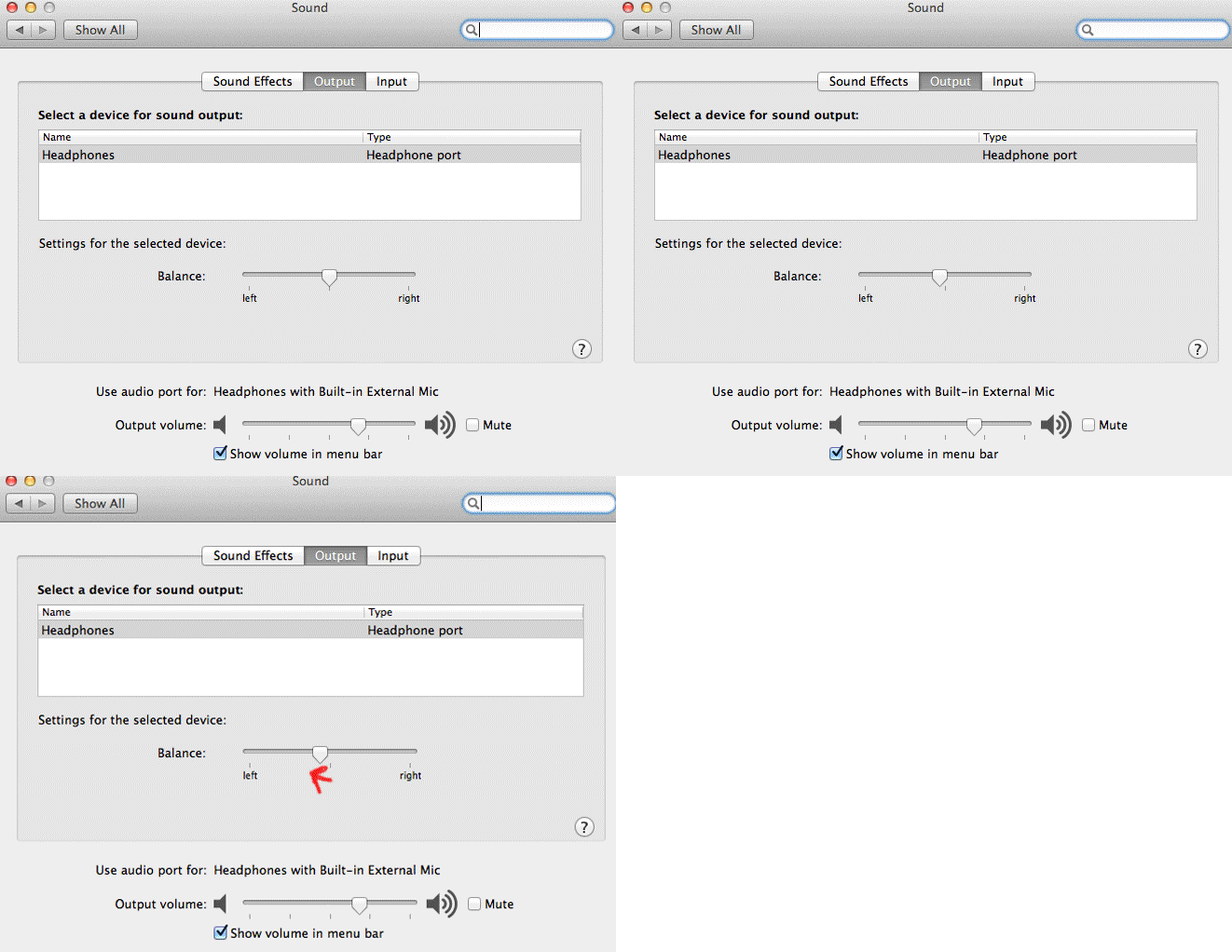
Tip 2: Balance your stereo speakers/headphones 
Since left ear can hear music quite good than your right ear so balancing your stereo speakers to left might help a lot. Since im using OSX i'll be taking you through its steps ,you can perform similar task on sound settings under control panel on windows OS.

Step 1: Open up preferences
Step 2: Click on sound icon
Step 3: Now drag the button to left (click on image below to play)
It really worked for me , You give it a try if it doesn't works for you then use the default settings provided.

Tip 3: Always download high quality songs

If you want to enjoy good music with greater sound quality you can buy them , never download songs from website , if you want high quality songs you can get them on torrent( i don't recommend you doing this , its illegal) be sure to choose songs that are more than 200 kbps in bit rate.

Tip 4: Never download songs from particular website that gives you songs free of cost

Though this might not be applicable for all but it's the same on most of the website , the songs you get on those websites are mis labelled, without artwork , without artist name without album name and are of very low quality.

Tip 5: Use better headphones
Only using the better sounds might not work using better head phones gives you better boost to excellent hearing pleasure, I can recommend you to go through bose headphone they are cheap( not that cheap BTW) and produce better sound than any other headphones , Apple headphones works quite fine.

If you found this post useful make sure to like this post (just by clicking the like button), If you faced any trouble to get above things done then let me know on the comments below, If you have any goods tips on this topic then help me to update this post , don't forget to mention them on the comments below.

Thursday, September 6, 2012

Disable user account control in windows 7

User account control (UAC) in the windows determines which user has how much of control over a file, data or a system.
You might want to create an exploit on you friends or any victims computer for future easy access then you might also want to go for disabling user account control. Disabling user account control allows all users and system to execute any/all type of files present on a computer.

In this post i'm going write steps on how to disable user account control in windows 7 using batch command execution. To disable user account control simply follow the steps below:

Step 1: press windows+R key to open RUN

Step 2: Type in "Notepad"

Step 3: Notepad window will open up then past the exact codes to your Notepad
 " C:\Windows\System32\cmd.exe /k %windir%\System32\reg.exe ADD HKLM\SOFTWARE\Microsoft\Windows\CurrentVersion\Policies\System /v EnableLUA /t REG_DWORD /d 0 /f " without quotes.
Step 4: Press Ctrl key +S then save it to Desktop

Step 5: Save file name  as " DUAC.bat "  and set as all file type remember all file types

Step 6: Double click on the file you just created then restart the computer and then you are done.

I hope this helped if you have any confusions then let me help you, you can mention them on the comments below.